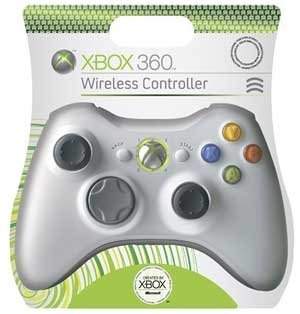
XBOX 360 Wireless Controller
Before you can use your Xbox 360™ Wireless Controller with an Xbox 360 console, you need to do two simple things:
-
Insert a battery pack. The wireless controller uses only the AA battery pack (provided) with AA disposable batteries or the Xbox 360 Rechargeable Battery Pack (sold separately).
-
Wirelessly connect your controller to your console.
INSERT BATTERIES
To insert batteries into the wireless controller AA battery pack:
-
Press the tab on the top of the AA battery pack and pull down to detach it from the controller.
-
Insert two new AA (LR6) batteries with their positive (+) and negative (–) ends positioned as shown on the underside of the battery pack. For best performance, AA rechargeable batteries are not recommended.
-
Slide the AA battery pack back into place on the controller and push it in to lock.
Connect your Controller
Up to four controllers, wired and wireless, can be actively connected to a console at one time. Each connected controller gets a quadrant on the Ring of Light. Before you can connect a wireless controller, at least one quadrant must be free (unlit). To disconnect a wireless controller, press and hold the wireless controller Xbox Guide button for three seconds, and then turn it off.
To connect your wireless controller to your console:
-
Press and hold down the Xbox Guide button until the controller turns on.
-
If your console is not on, press the Power button to turn on the console.
-
Press and release the connect button on the console.
-
Press and release the connect button on the controller.
-
After the Ring of Light on the controller and console spin and flash once, the controller is connected. The quadrant that remains lit indicates the controller's position.
Turn Your Console and Controller On
To turn your console and controller on, press and hold the Xbox Guide button until the controller turns on.
To turn on your console only, press the power button on your console. To turn on your controller only, press the Start button on your controller.
Turn Your Console and Controller Off
To turn your console and controller off, press and hold the Xbox Guide button on your controller for three seconds. Then select whether you want to turn off just your controller or both your controller and your console. (Selecting the console will turn off both the console and all connected controllers.)
To turn off your console only, press the power button on your console.
Notes
-
When you turn off your console, your controller will still be connected the next time you turn it on.
-
Your controller is connected to only one console at a time. You can connect to a new console at any time, but your connection to the previously connected console will be lost.
-
The Xbox 360 Wireless Controller works only within 30 feet (nine meters) of the console. Objects between the controller and the console can reduce this range.